
Advanced File Search
Product information
Release v1.1.0 (Updated )
Reviews
0 von 5 Sternen
0 purchases
Fast keyword search, recursive deep scans, category filters, and keyboard navigation for Pterodactyl File Manager.
$5.00
Release history

Description
Instant File Names & Deep Content Search
• File and Folder Names: Real-time filtering and recursive asynchronous deep scans across all server subdirectories.
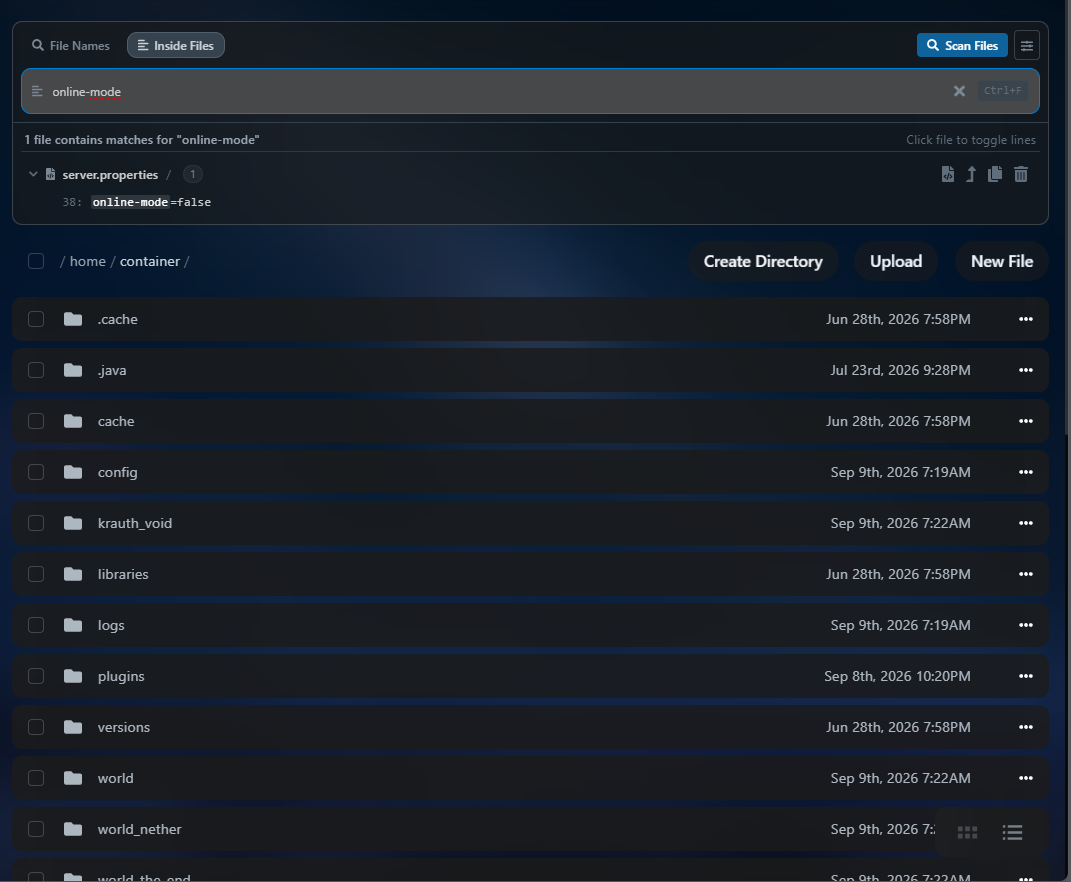
• Inside Files (Content Search): Search text directly inside configs, scripts, and logs (.yml, .json, .sk, .lua, .properties, etc.) with direct jump-to-
line capability in the editor.
Structured Tree Results Results grouped neatly by file just like in VS Code - collapsible headers displaying file type icons, filenames, relative paths, and indented code snippets with highlighted matches without repeating filenames on every line.
Discreet Inline Search Bar Clean search input with inline "X of Y" match counter, navigation arrows, and filtering toggles built right into the field without bulky colored boxes.
Minimalist Category Filters Low-profile chips for instant 1-click filtering: Configs (.yml, .json), Archives (.zip, .jar), Logs (.log, .txt), Scripts, and Folders.
Global Keyboard Shortcuts Press Ctrl + F (or Cmd + F on macOS) anywhere in the File Manager to focus search, Enter / Shift + Enter to cycle matches, and Esc to clear or dismiss.
Monochromatic Quick Actions
Subtle monochromatic action buttons that reveal on hover: open in web editor, jump directly to match line, reveal in folder, direct signed download
link, and copy relative path.
Advanced Search Options
Full support for Match Case (Aa) and Regular Expressions (.*).
Seamless Compatibility 100% compatible with Blueprint Framework and responsive across all standard Pterodactyl themes (Default, Nebula, Slate, Dark).