Pelican Panel Server Extension | Paymenter
Product information
Release v1.0.0 (Updated )
Reviews
0 von 5 Sternen
1 downloads
Free Paymenter server extension for Pelican Panel: creates, suspends, upgrades and deletes game servers. Eggs and egg variables from Pelican, node tags, port ranges and arrays, a Go to server button that works, clear errors. MIT.
Release history
Description
Sell game servers on Pelican Panel with Paymenter. When an order is paid, Paymenter creates the server in Pelican, and Paymenter's suspend, unsuspend, upgrade and terminate actions change it there. Customers get a Go to server button that opens their server in Pelican.
Paymenter has no Pelican extension: not in Paymenter 1.5.9, and not in its development branch (checked on 25 October 2026). It is a long-standing request (Paymenter discussion #535). Pelican started as a fork of Pterodactyl, but its API has changed enough that the Pterodactyl extension does not work with it. This extension starts from Paymenter's own (MIT) Pterodactyl extension and follows Pelican's current Application API.
What it does
- Creates the server when an order is paid, with the product's egg, Docker image, egg variables, memory, swap, disk, CPU, IO weight, CPU pinning, and database, backup and port limits.
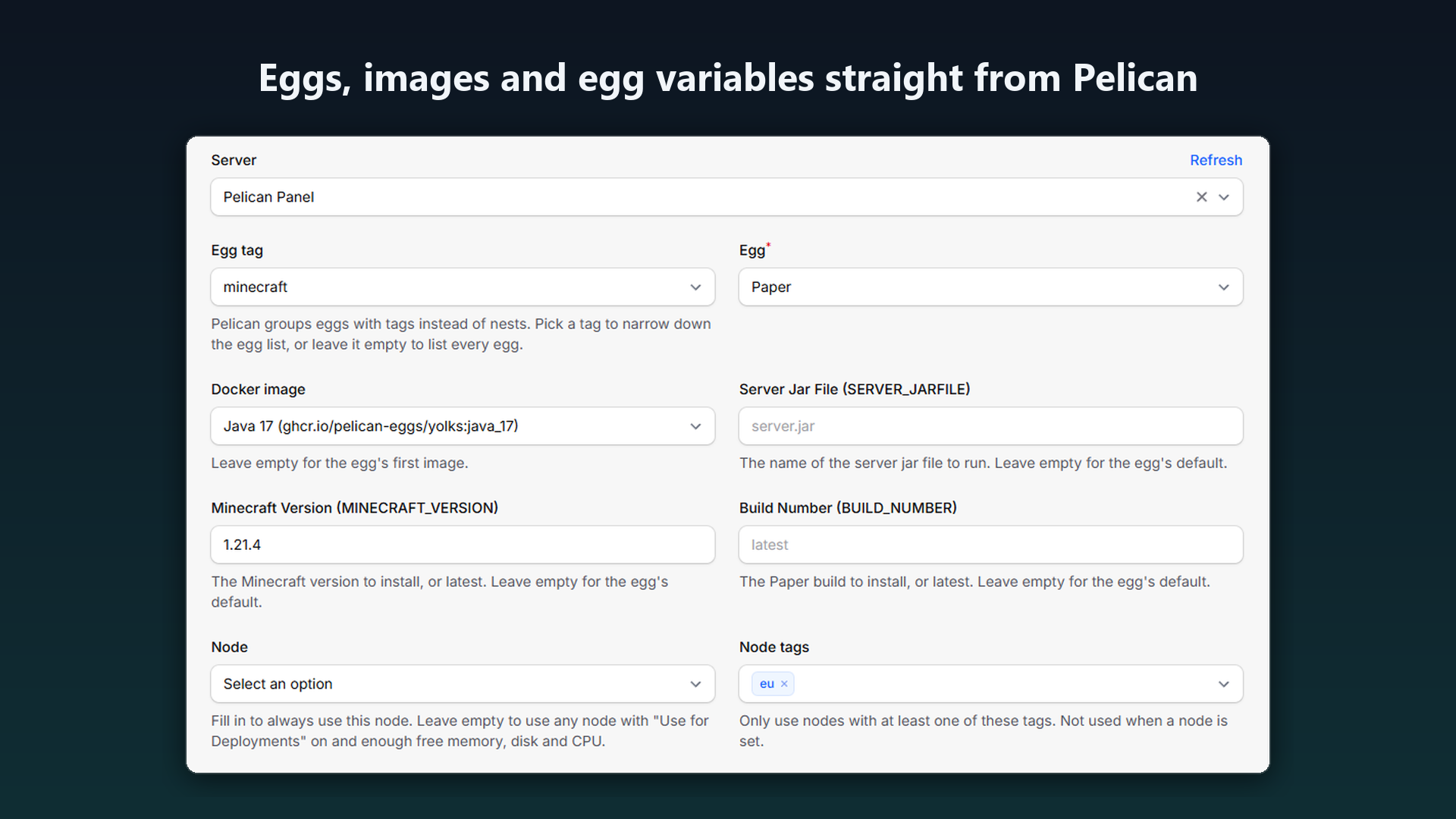
- Eggs straight from Pelican. Pelican has no nests: the product page lists every egg, narrows the list by egg tag, and shows the egg's Docker images and one field per egg variable, with the egg's default as a hint.
- Node tags or a fixed node. Pelican has no locations: a product can use any node with one of its node tags, or always the same node.
- Every server gets a port. Pelican's own automatic deployment only assigns a port when a port range is sent, so the extension picks the node and the port itself from the nodes Pelican reports as deployable. Port ranges, port arrays (for example a query port written to its egg variable) and dedicated IP addresses are supported.
- The right customer account. Pelican's email filter also matches parts of addresses (bob@example.com finds jimbob@example.com too), so the extension reads every page of matches and takes the account with exactly the customer's address. Without one it creates an account, and Pelican emails a link to set the password.
- Suspend, unsuspend, upgrade and terminate from Paymenter's jobs and from the admin's Trigger Extension Action. Upgrades change the same server and keep its egg variables.
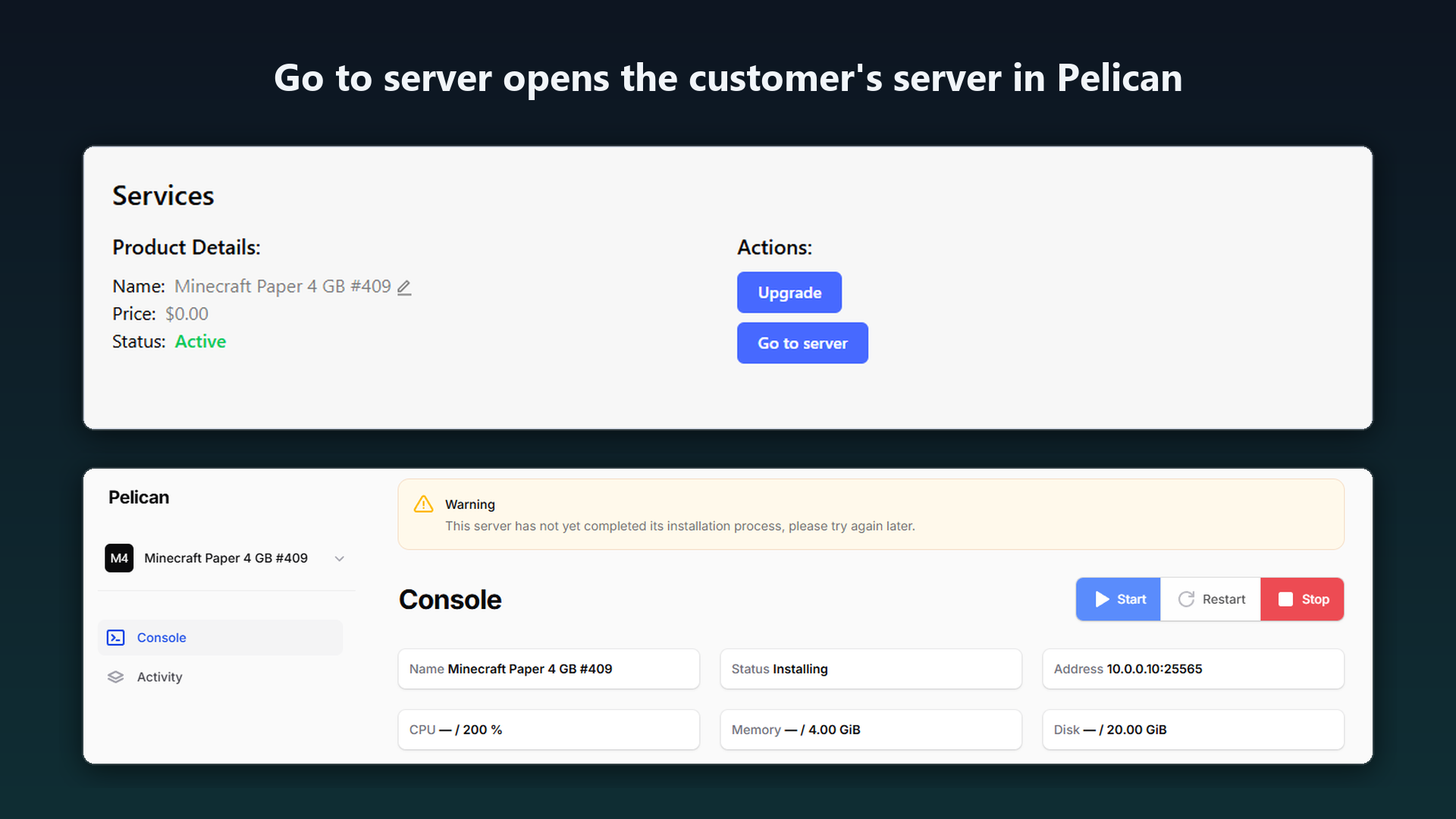
- Go to server opens
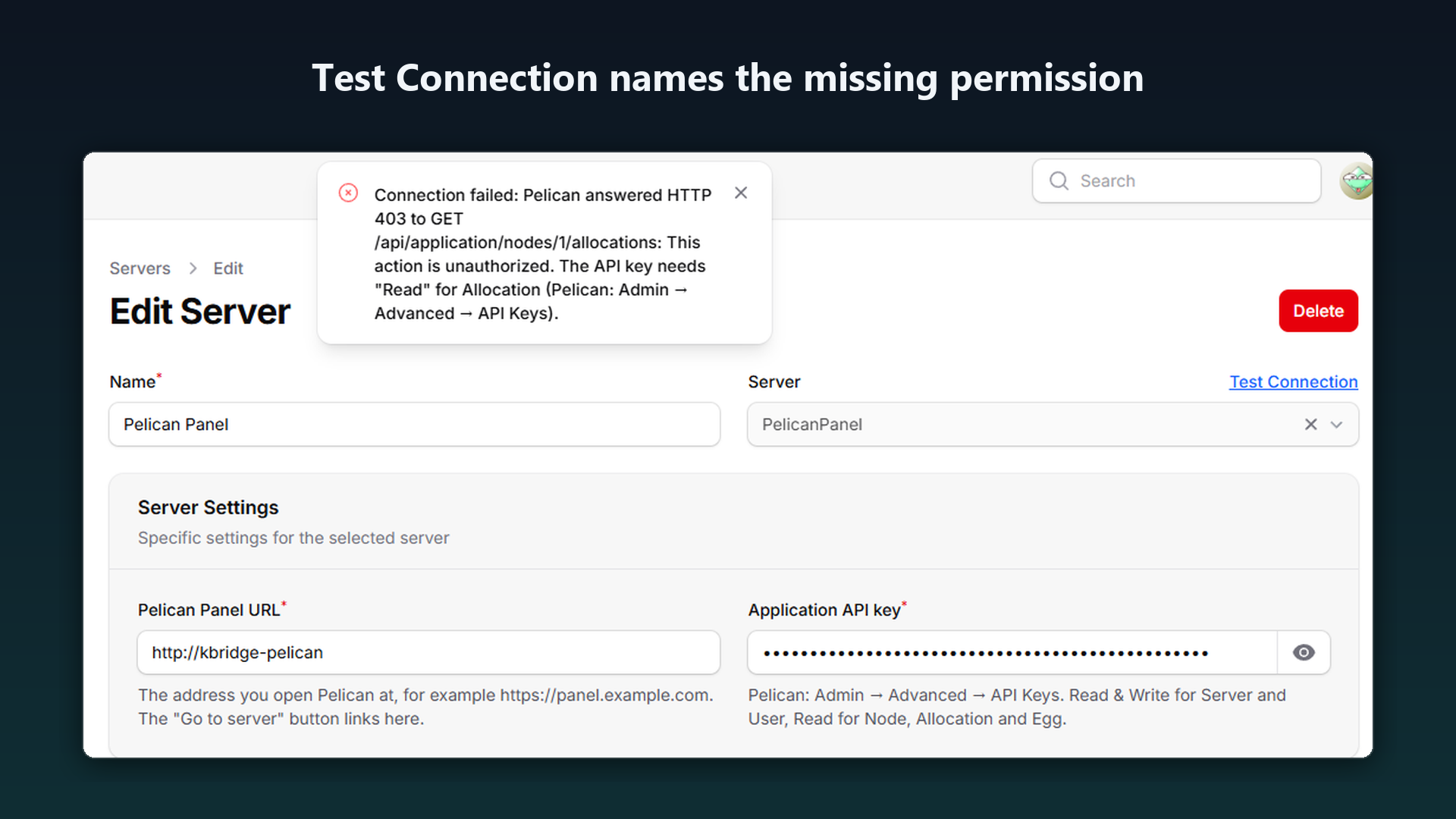
https://your-panel/server/, which Pelican takes to the server's console after sign-in. - Test Connection checks the URL, the key and every read permission, and names the missing one.
- Clear errors, for example:
Pelican answered HTTP 403 to POST /api/application/users: This action is unauthorized. The API key needs "Read & Write" for User (Pelican: Admin → Advanced → API Keys). - Every page of every list is read (nodes and users come 50 per page unless asked for more).
Screenshots
- Eggs, images and egg variables straight from Pelican.
- Go to server opens the customer's server in Pelican.
- Test Connection names the missing permission.
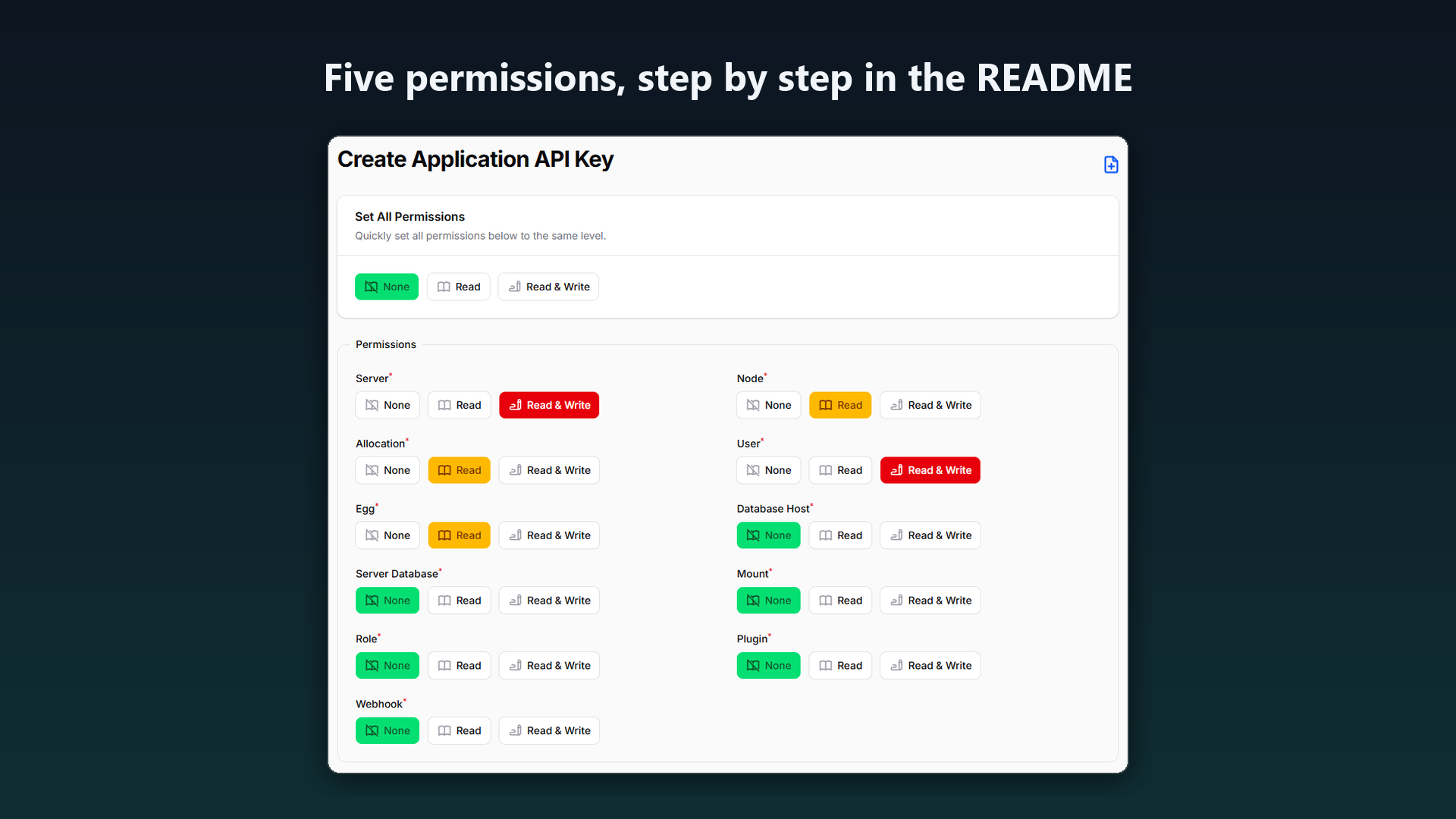
- Five permissions, step by step in the README.
Compatibility
Tested with Paymenter 1.5.9 and Pelican Panel v1.0.0-rc.2 (the newest Pelican release on 25 October 2026). Wings was a local stand-in that accepts every request, so real nodes were not part of the test.
Install
- Admin → Extensions → Available Extensions → Upload Extension, and upload the zip ("Server uploaded successfully").
- In Pelican: Admin → Advanced → API Keys → +. Set Server and User to Read & Write, Node, Allocation and Egg to Read, everything else to None, and create the key.
- In Paymenter: Admin → Servers → Create, Server PelicanPanel, enter the Pelican URL and the key, and click Test Connection.
- On each product: Server tab → the Pelican server, then the egg, the node tags (or a node) and the resources.
Differences from the Pterodactyl extension
- Eggs without nests (egg tag filter), node tags instead of locations.
- The extension picks the port; Pelican's automatic deployment would leave the server without one.
- Egg variables and the Docker image can be set on the product page; config options named after a variable still work.
- The customer's account is matched by the whole email address, on any page.
- After an upgrade the allocation limit still counts the server's own ports.
- Terminating a server that was already deleted in Pelican succeeds.
- Products have to be set up again (eggs, nodes and tags live in Pelican).
FAQ
Does the customer get a Pelican password? If the account is new, Pelican emails a link to set one (Pelican needs working mail settings). Existing accounts with the same email address are used as they are.
"Go to server" shows 404 in Pelican. The browser is signed in to Pelican as someone who does not own the server; Pelican answers 404 for other users' servers. Sign out or sign in as the customer.
Can customers choose the memory or a game version?
Yes, with Paymenter config options whose environment variable is memory (or another product setting) or the egg variable's name, such as MINECRAFT_VERSION.
Does it reinstall a server on upgrade? No. It changes the resources of the same server. A product with another egg moves the server to that egg; Pelican does not reinstall it by itself.
Pterodactyl? Use Paymenter's Pterodactyl extension for Pterodactyl 1.x. This one is for Pelican.
Support
Ask on this product page. Please include the message Paymenter showed, your Paymenter version and your Pelican version.
Free and open source under the MIT license, based on Paymenter's MIT Pterodactyl extension. "Paymenter", "Pelican" and "Pterodactyl" are used only to describe compatibility.
More tools for Paymenter and Pterodactyl hosts: https://karelialabs.com